
Why the Right Accessories Transform Your Gaming Desk
You've got the PC. You've got the peripherals. But if your desk still looks like a tangled mess with your monitor sitting on textbooks, you're leaving performance — and comfort — on the table. After extensive research across expert reviews and user feedback, here are the 8 gaming desk setup essentials every gamer needs in 2026.
Our Top Picks at a Glance
| Rank | Product | Best For | Price |
|---|---|---|---|
| 🥇 | Ergotron LX Desk Mount | Best Monitor Arm | ~$170 |
| 🥈 | VIVO Dual Monitor Stand | Best Budget Arm | ~$40 |
| 🥉 | Razer Thunderbolt 4 Dock | Best USB Hub/Dock | ~$330 |
| 4 | Corsair MM700 RGB | Best Desk Mat | ~$50 |
| 5 | J Channel Cable Raceway | Best Cable Management | ~$15 |
| 6 | Corsair ST100 RGB | Best Headphone Stand | ~$50 |
| 7 | Elgato Multi Mount | Best Webcam/Mic Mount | ~$50 |
| 8 | Kasa Smart Power Strip | Best Smart Power Strip | ~$30 |
1. Ergotron LX Desk Mount — Best Monitor Arm Overall

🥇 Ergotron LX Desk Mount
Why we love it: The gold standard of monitor arms. The constant-force spring mechanism lets you reposition your monitor with a single finger — no wobble, no drift. Supports monitors up to 34" and 25 lbs, covering virtually every gaming monitor including ultrawides.
Key specs:
- Supports up to 34" / 25 lbs
- Constant-force spring for one-finger repositioning
- Aluminum construction with integrated cable management
- Clamp and grommet mount options
- 10-year warranty
| Pros | Cons |
|---|---|
| Buttery-smooth articulation with zero drift | Premium price — 2-3x budget options |
| Supports up to 25 lbs — handles ultrawides | Clamp needs ~2.5" of desk depth |
| Integrated cable management channel | Single monitor only |
| 10-year warranty | Overkill for lightweight 24" monitors |
| Frees up massive desk space |
Verdict: If there's one accessory that delivers the biggest single upgrade to your gaming desk, it's a quality monitor arm — and the Ergotron LX is the best you can buy.
2. VIVO Dual Monitor Stand V002 — Best Budget Monitor Arm

🥈 VIVO Dual Monitor Stand V002
Why we love it: Not everyone needs Ergotron's silky-smooth articulation. For a fraction of the price, you get a fully adjustable dual monitor arm handling two screens up to 27". Instantly doubles your usable desk space.
Key specs:
- Supports two monitors up to 27" (22 lbs each)
- Gas spring for tool-free adjustment
- Quick-release VESA plates
- Cable management clips included
- Desk clamp mount
| Pros | Cons |
|---|---|
| Exceptional value for dual-monitor setups | Not as smooth as premium options |
| Gas spring allows tool-free adjustment | Slightly wobbly at full extension |
| Quick-release VESA plates for easy install | Limited tilt range vs Ergotron |
| Cable management clips included | Needs 3" desk overhang |
Verdict: The best value in dual-monitor arms. Perfect for your main gaming display plus a secondary screen for Discord or stream chat.
3. Razer Thunderbolt 4 Dock — Best USB Hub/Docking Station

🥉 Razer Thunderbolt 4 Dock
Why we love it: A single cable to rule them all. 40 Gbps bandwidth across 10+ ports including USB-C, USB-A, Ethernet, SD card reader, and audio. Chroma RGB integrates with Razer Synapse. Future-proofed for 4K 120Hz and 90W laptop charging.
Key specs:
- Thunderbolt 4 with 40 Gbps bandwidth
- 10+ ports (USB-C, USB-A, Ethernet, SD, audio)
- Drives up to two 4K displays
- 90W power delivery for laptop charging
- Chroma RGB integration
| Pros | Cons |
|---|---|
| 40 Gbps covers every connectivity need | Premium Razer pricing |
| Chroma RGB integrates with ecosystem | Requires TB4 device for full features |
| Drives two 4K displays simultaneously | Razer Synapse can be bloated |
| 90W power delivery | No front-facing USB-A port |
| Compact aluminum design |
Verdict: If you're gaming on a laptop and docking at your desk, this is non-negotiable. One cable for everything.
4. Corsair MM700 RGB — Best Extended Desk Mat

4️⃣ Corsair MM700 RGB Extended Desk Mat
Why we love it: A premium micro-weave surface with customizable 360-degree RGB edge lighting. The 36 x 15.8" surface covers keyboard and mouse with room to spare, while 4mm thickness provides comfort for long sessions. Integrates with Corsair iCUE.
Key specs:
- 36" x 15.8" surface area
- 360-degree RGB with iCUE integration
- Micro-weave surface (speed + control balance)
- 4mm cushioning
- USB passthrough port
- Anti-skid rubber base
- Machine washable
| Pros | Cons |
|---|---|
| Huge surface covers full keyboard + mouse | RGB adds to price vs non-lit mats |
| 360° RGB with iCUE integration | USB cable is hardwired |
| Balances speed and control | White version shows dirt |
| USB passthrough — no lost ports | iCUE software required for RGB |
| Machine washable |
Verdict: The unsung hero of desk accessories. Function and aesthetics combined in one mat.
5. J Channel Cable Raceway Kit — Best Cable Management
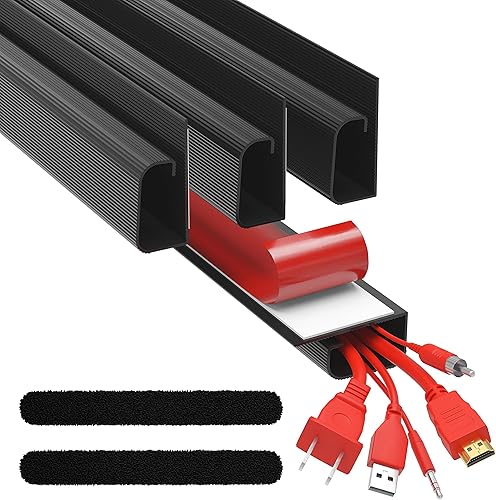
5️⃣ J Channel Cable Raceway Kit
Why we love it: The simplest, most effective way to eliminate cable spaghetti. Adhesive-backed J-shaped channels mount underneath your desk — peel, stick, route. The open-top design makes adding or removing cables easy. A $15 investment that makes your setup look like it cost thousands.
Key specs:
- Multiple J-shaped channels with adhesive backing
- Open-top design for easy cable access
- Works with any desk material (wood, metal, glass)
- Paintable to match desk color
- No drilling or tools required
| Pros | Cons |
|---|---|
| Incredibly affordable for the transformation | Adhesive may not hold on textured surfaces |
| No drilling — adhesive mounting | Not great for thick cable bundles |
| Open-top for easy cable access | Visible if desk underside faces outward |
| Works with any desk material | May need velcro ties for heavy cables |
| Paintable |
Verdict: The highest-impact yet most affordable accessory on this list. Punches way above its price point.
6. Corsair ST100 RGB — Best Gaming Headphone Stand

6️⃣ Corsair ST100 RGB Headphone Stand
Why we love it: Your $300 headset deserves better than being tossed on the desk. Purpose-built stand that doubles as a USB hub and ambient light source. Weighted aluminum base, padded hook, and two USB 3.1 passthrough ports.
Key specs:
- Premium aluminum construction with weighted base
- Padded rubber hook protects headband
- Two USB 3.1 passthrough ports
- iCUE-compatible RGB underglow
- 3.5mm analog output for non-USB headsets
| Pros | Cons |
|---|---|
| Premium aluminum with weighted base | Pricey for a headphone stand |
| Two USB 3.1 passthrough ports | RGB only on the base |
| iCUE RGB underglow | Requires iCUE software |
| 3.5mm analog output | Not height-adjustable |
| Compact footprint |
Verdict: A small but meaningful desk upgrade. The USB passthrough ports alone justify the price.
7. Elgato Multi Mount System — Best Webcam & Mic Mount
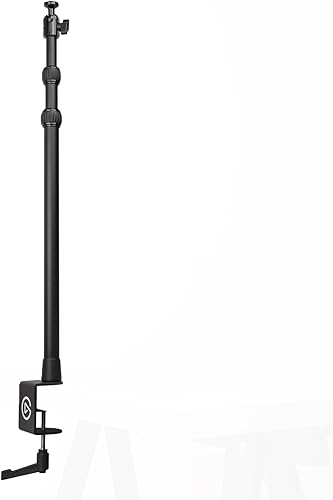
7️⃣ Elgato Multi Mount System
Why we love it: A modular mounting solution that gets webcams and microphones off your desk. Start with a desk-clamp pole, add modular arms for webcam, ring light, microphone, or phone. The flex arms hold position firmly — and the modular design means you never outgrow it.
Key specs:
- Desk-clamp pole with adjustable height
- Modular flex arms (sold separately)
- Compatible with 1/4" and 3/8" threads
- Rock-solid clamp mount
- Expandable over time
| Pros | Cons |
|---|---|
| Modular — buy only what you need | Full system gets expensive |
| Rock-solid desk clamp | Pole can look imposing on small desks |
| Flex arms hold position without drift | Arms require some force to adjust |
| Standard thread compatibility | Clamp needs a desk edge |
| Frees significant desk space |
Verdict: Essential for streamers, optional for everyone else. The expandable design means you buy once and build over time.
8. Kasa Smart Power Strip (KP303) — Best Smart Power Strip

8️⃣ Kasa Smart Power Strip (KP303)
Why we love it: Control each outlet individually via app or voice. "Good night" turns off monitors, speakers, and lights. Schedule your setup to power on before you get home. Built-in surge protection (720J) adds peace of mind.
Key specs:
- Three individually controllable smart outlets
- Two always-on USB charging ports
- Works with Alexa, Google Home, SmartThings
- Built-in surge protection (720J)
- Scheduling and timer features via Kasa app
- No hub required — direct Wi-Fi
| Pros | Cons |
|---|---|
| Three individually controllable outlets | Only 3 smart outlets |
| Alexa, Google, SmartThings compatible | 2.4 GHz Wi-Fi only |
| Two always-on USB ports | USB ports are low-wattage |
| Built-in surge protection (720J) | Modest surge protection rating |
| Scheduling and timers | |
| Compact behind-desk design |
Verdict: The most underrated desk accessory. Small upgrade that feels futuristic once you have it.
Building Your Perfect Gaming Desk Setup: A Priority Guide
If you're on a budget and can't buy everything at once, here's the recommended order:
- Cable management ($15) — Biggest visual impact per dollar
- Monitor arm ($30-170) — Biggest ergonomic impact
- Desk mat ($30-60) — Comfort and aesthetics combined
- Smart power strip ($25-35) — Convenience you'll use daily
- USB hub/dock ($50-300) — Depends on connectivity needs
- Headphone stand ($20-60) — Nice to have, not essential
- Webcam/mic mount ($40-100) — Essential for streamers only
Frequently Asked Questions
Q: What are the must-have gaming desk accessories? A: Monitor arm (ergonomics + desk space), cable management (aesthetics), and extended desk mat (comfort + mouse performance). These three transform any basic desk into a proper gaming station.
Q: Do I need a monitor arm if my monitor has a stand? A: Technically no, but a monitor arm frees 30-50% of desk space, allows perfect ergonomic positioning, and eliminates neck strain. Once you switch, you'll never go back.
Q: Are RGB desk accessories worth it? A: If you enjoy ambient lighting and want a cohesive aesthetic, yes. If purely function-focused, non-RGB alternatives save money without sacrificing performance.
Q: How much should I spend on gaming desk accessories? A: A solid set of essentials costs $100-150 (cable management, budget monitor arm, desk mat). A premium setup runs $400-600. Start with highest-impact items and expand over time.
Q: Can I use these with a standing desk? A: Yes — every product on this list works with standing desks. The Ergotron LX is especially popular with standing desk users due to its wide range of motion.
Our Verdict
The best gaming desk accessories solve real problems. A monitor arm fixes your posture. Cable management makes your space calmer. A smart power strip saves energy. Start with the basics, upgrade over time, and build a setup that works as hard as you game.
Last updated: March 2026. We regularly research and update our recommendations.