How to Build a Smart Gaming Setup on a Budget
Creating a smart gaming setup doesn't have to break the bank. With the right strategy and smart product choices, you can build an impressive, feature-rich gaming environment for under $200. This comprehensive guide will show you exactly how to maximize your gaming experience while minimizing costs.
We'll cover everything from essential smart devices to DIY modifications that add premium features without premium prices. Whether you're a student, casual gamer, or anyone looking to upgrade smartly, this guide has you covered.
Budget Breakdown: Smart Gaming Setup Under $200
| Category | Essential Items | Budget Range | Smart Features |
|---|---|---|---|
| Smart Lighting | LED strips, smart bulb | $15-40 | Color sync, scheduling |
| Power Management | Smart plugs, basic power strip | $15-30 | Remote control, scheduling |
| Audio Enhancement | Budget smart speaker | $25-50 | Voice control, music sync |
| Environmental | Smart switch, fan control | $20-40 | Automated climate control |
| Monitoring | Basic security camera | $25-60 | Setup monitoring, streaming |
| Total Budget | Complete smart setup | $100-220 | Full automation |
Phase 1: Essential Smart Lighting ($15-40)
Lighting is the most impactful upgrade you can make to any gaming setup. It dramatically improves aesthetics and reduces eye strain during long gaming sessions.
Option A: Ultra Budget - Daybetter LED Strip ($12-18)
ASIN: B08D99TWQJ - 32.8ft Kit with Remote
What you get:
- 32.8 feet of RGB LED strips
- Remote control with preset modes
- Color changing capabilities
- Easy adhesive installation
Installation tips:
- Run strips behind your monitor for bias lighting
- Frame your desk perimeter for ambient glow
- Use extra length for room accent lighting
- Cut and reconnect for custom layouts
Pros: Incredibly cheap, lots of length, good brightness Cons: No smart features, remote-only control
Option B: Smart Budget - Daybetter Smart RGB Strip ($25-35)
ASIN: B0BKG9SLQV - Smart App Control LED Strips
Smart features:
- WiFi app control from your phone
- Music sync mode
- Voice control compatibility
- Scheduling and timers
- Custom color creation
Why upgrade: The extra $10-15 gets you full smart home integration, making your lighting responsive to your gaming schedule.
DIY Enhancement: Monitor Bias Lighting
For professional-looking monitor bias lighting:
- Measure your monitor's back perimeter
- Cut LED strips to fit exactly
- Clean monitor back with alcohol wipes
- Apply strips 2 inches from the edge
- Use cable ties for clean cord management
Pro tip: Set warm white (3000K) for general computing and vibrant colors for gaming. This reduces eye strain while maintaining atmosphere.
Phase 2: Smart Power Management ($15-30)
Smart power management saves energy, protects equipment, and adds convenience to your gaming routine.
Essential: Amazon Smart Plug ($6-12 each)
ASIN: B089DR29T6 - Amazon Smart Plug
Buy 3-4 plugs for:
- Secondary monitors (auto-off when not gaming)
- RGB lighting (scheduled activation)
- Speakers/audio gear (power saving mode)
- Streaming equipment (on-demand control)
Smart automations to set up:
- Gaming mode: Turn on all accessories when main PC boots
- Energy saver: Turn off non-essential gear at 2 AM
- Away mode: Everything off when you leave home
- Storm mode: Safely shut down during weather alerts
Budget Power Strip: BESTEK 3-Outlet Cube ($25-35)
ASIN: B076BMVYTM - Vertical Cube with USB
Why choose this:
- Compact vertical design saves desk space
- 3 AC outlets + 4 USB ports (including USB-C)
- Wall mountable under desk
- Surge protection included
Smart setup strategy: Combine with smart plugs for ultimate control. Use the power strip for always-on devices (router, main PC) and smart plugs for controllable peripherals.
Phase 3: Budget Smart Audio ($25-50)
Audio enhancement dramatically improves gaming immersion and adds voice control to your setup.
Option A: Amazon Echo Dot (5th Gen) ($30-50)
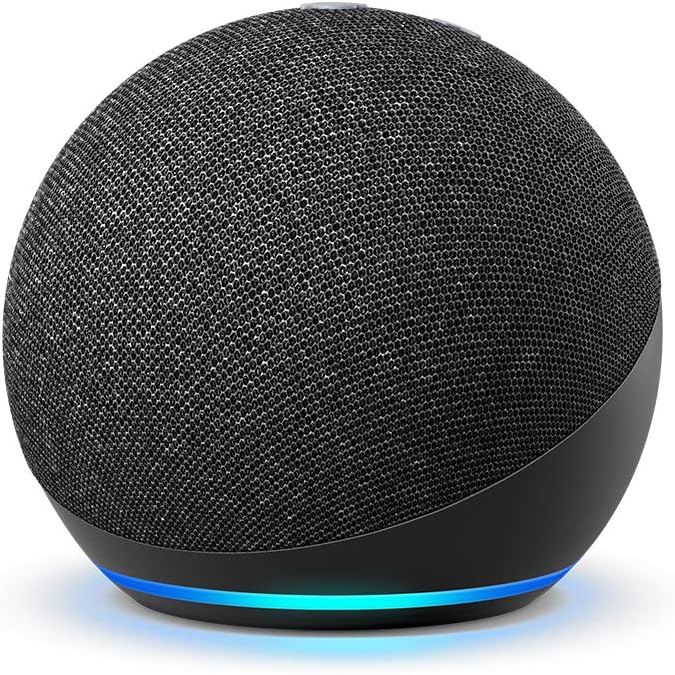
Features for gaming:
- Voice control for all smart devices
- Music streaming during gaming breaks
- Timer and reminder functions
- Smart home hub capabilities
- Decent sound quality for the price
Gaming voice commands:
- "Alexa, turn on gaming mode" (activates lighting scene)
- "Alexa, set a timer for 2 hours" (healthy gaming limits)
- "Alexa, play focus music" (concentration playlists)
- "Alexa, turn off everything" (quick shutdown)
Option B: WiZ Connected Smart Speaker ($40-60)
If available in your region, WiZ offers decent speakers with built-in smart lighting control, perfect for budget setups combining audio and lighting needs.
DIY Audio Enhancement
Upgrade your existing speakers:
- Smart Plug Integration: Any speakers become "smart" with scheduling
- Audio Cable Management: Use adhesive cable clips for clean routing
- Positioning Optimization: Angle speakers toward your ears, not the monitor
- Bass Enhancement: Place speakers on foam pads to reduce vibration
Phase 4: Environmental Control ($20-40)
Smart environmental control keeps your gaming space comfortable and energy-efficient.
Smart Light Switch ($15-25)
Replace your room's light switch with a smart version. This allows:
- Voice control of overhead lighting
- Automated dimming for different gaming scenarios
- Integration with other smart devices
- No need to buy smart bulbs for every fixture
Smart Fan Control ($20-30)
If you have a ceiling fan, a smart fan controller adds:
- Temperature-based automation
- Scheduled operation during gaming sessions
- Voice control for comfort adjustment
- Energy monitoring
DIY Climate Solutions
Budget cooling enhancement:
- USB desk fans: $10-15 for personal cooling
- Smart outlet timer: Automate window fans
- Temperature monitoring: Use phone apps to track optimal conditions
- Airflow optimization: Strategically place obstacles to direct airflow
Phase 5: Monitoring and Security ($25-60)
A budget security camera serves multiple purposes in a gaming setup.
WYZE Cam v3 ($25-35)
Gaming applications:
- Monitor your setup when away
- Stream your reactions during gaming
- Time-lapse your long building sessions
- Security for expensive equipment
Smart features:
- Motion detection alerts
- Night vision for 24/7 monitoring
- Two-way audio for communication
- Free cloud storage (limited)
Alternative: Webcam + Software ($30-50)
Transform any USB webcam into a smart monitoring solution:
- OBS Studio: Free streaming and recording software
- ManyCam: Adds smart features to basic webcams
- Phone apps: Use old smartphones as security cameras
- Cloud storage: Google Drive/OneDrive for footage backup
Smart Gaming Automation Ideas
Gaming Mode Automation
Set up a single command that:
- Turns on all gaming peripherals
- Sets lighting to your preferred gaming colors
- Adjusts room temperature
- Starts background music or focus sounds
- Activates Do Not Disturb mode on devices
Energy Saving Schedule
Automate power management:
- Midnight: Turn off all non-essential lighting
- 2 AM: Shut down secondary monitors and speakers
- 6 AM: Wake up lighting gradually
- Weekends: Different schedule for longer gaming sessions
Streaming Mode
For content creators on a budget:
- Lighting preset: Optimal lighting for webcam quality
- Audio routing: Smart speaker muted, headset prioritized
- Monitoring activation: Security camera for room overview
- Notification silence: Smart devices enter Do Not Disturb
DIY Smart Features That Cost Almost Nothing
Phone as Smart Hub
Your smartphone can serve as the central control point:
- Smart home apps: Control all devices from one place
- Automation apps: IFTTT for custom device interactions
- Voice control: Google Assistant/Siri for hands-free control
- Monitoring: Camera feeds and device status
Custom RGB Profiles
Create mood lighting for different games:
- FPS games: Red and orange for intensity
- RPGs: Purple and blue for immersion
- Racing games: Dynamic color changing
- Strategy games: White and blue for focus
Cable Management System
Professional-looking cable management for under $20:
- Adhesive cable clips: $5 for 20+ clips
- Velcro ties: $3 for reusable organization
- Cable sleeves: $8 for bundling multiple cables
- Desk grommets: $5 for clean cable routing
Shopping Strategy: Maximize Your Budget
Best Times to Buy
- Prime Day/Black Friday: Up to 50% off smart devices
- Back to school season: Discounted tech accessories
- End of year clearance: Previous generation smart devices
- Daily deals: Amazon Lightning Deals and similar
Bundle Opportunities
Look for multi-packs:
- Smart plugs: 4-pack usually costs less than 3 individual plugs
- LED strips: Longer lengths offer better value per foot
- Smart bulbs: Starter packs often include free hubs
Quality vs Price Balance
Spend more on: Power-related devices (surge protectors, smart plugs) Save on: Decorative lighting, basic sensors Compromise on: Brand names for functionality that's identical across brands
Integration with Existing Gaming Setup
PC Integration
Connect your smart devices to your gaming PC:
- Home Assistant: Free software for advanced automation
- Razer Synapse: RGB sync with some smart lights
- Corsair iCUE: Integration with compatible smart devices
- Custom scripts: Automate based on what game you're playing
Console Integration
Smart features for console gaming:
- HDMI CEC: Some smart devices respond to console on/off
- Voice assistants: Control devices without interrupting gameplay
- App control: Manage lighting and environment from your phone
- Scheduled activation: Devices turn on when you usually game
Maintenance and Expansion
Keeping Costs Low Long-term
- Regular updates: Keep device firmware updated for best performance
- Energy monitoring: Track which devices actually save money
- Gradual expansion: Add one category every 2-3 months
- Quality over quantity: Better to have fewer reliable devices
Expansion Path
As your budget allows, upgrade in this order:
- Better power management: Upgrade to smart power strips
- Premium lighting: Add Govee or WiZ smart lights
- Enhanced audio: Upgrade to better smart speakers
- Advanced automation: Add sensors and smart switches
- Monitoring upgrades: Better cameras and security features
Troubleshooting Common Budget Setup Issues
WiFi Connectivity Problems
Budget devices often struggle with WiFi:
- Solution: Use 2.4GHz network for smart devices
- Router placement: Ensure good signal to gaming area
- Network separation: Create guest network for smart devices
- Range extenders: $20 extenders solve connectivity issues
App Management
Multiple device apps can be overwhelming:
- Solution: Use universal apps like Smart Life or Alexa app
- Organization: Group devices by room or function
- Voice control: Reduce app dependency with voice commands
- Routines: Set up automations to minimize manual control
Related Gaming Setup Guides
For more specific gaming setup advice:
- Best Gaming Desk Setup Accessories
- Best Smart Power Strip for Gaming Desk Setup
- Best LED Strip Lights for Gaming Setup
- Best Cable Management Kit for Gaming Setup
Sample $150 Complete Setup
Here's a real-world example of a complete smart gaming setup under $150:
Lighting: Daybetter Smart RGB Strip - $30 Power: 4x Amazon Smart Plugs - $40 Audio: Amazon Echo Dot - $35 Environmental: Smart light switch - $20 Monitoring: WYZE Cam - $25
Total: $150
What you get:
- Full voice control of your gaming environment
- Automated lighting that responds to your schedule
- Remote control of all peripherals
- Energy monitoring and savings
- Security monitoring when away
Final Tips for Budget Smart Gaming
- Start small: Begin with lighting and power management
- Research compatibility: Ensure devices work with your preferred voice assistant
- Plan for expansion: Choose devices that play well with others
- Don't rush: Wait for sales on higher-priority items
- Measure impact: Track energy savings to justify smart device costs
Building a smart gaming setup on a budget requires patience and strategic thinking, but the results are incredibly rewarding. You'll have a setup that rivals much more expensive solutions while staying within reasonable financial limits.
The key is focusing on high-impact upgrades first: lighting transforms the visual experience, smart power management adds convenience and saves money, and voice control makes everything effortless. From there, you can expand gradually as your budget allows.
Remember, the goal isn't to have the most expensive smart devices—it's to create a gaming environment that enhances your experience while staying within your means. With these strategies and product recommendations, you're well on your way to a truly smart gaming setup that won't break the bank.
This article contains affiliate links. We earn a small commission from qualifying purchases at no additional cost to you.