Philips Hue Play Bar vs Govee Light Bar for Gaming
When it comes to creating the perfect gaming atmosphere, lighting plays a crucial role in both immersion and eye comfort. Two brands have emerged as leaders in the gaming light bar space: Philips Hue with their premium Play Light Bars, and Govee with their feature-packed, budget-friendly alternatives.
In this comprehensive comparison, we'll examine both options across every metric that matters to gamers, from color accuracy and brightness to smart features and value for money. Whether you're building your first RGB setup or upgrading an existing one, this guide will help you make the right choice.
Quick Comparison Table
| Feature | Philips Hue Play Bar | Govee Light Bars |
|---|---|---|
| Price | $130-160 (2-pack) | $30-80 (depending on model) |
| Colors | 16.7 million | 16.7 million |
| Brightness | 530 lumens per bar | 400-600 lumens (varies) |
| Smart Hub Required | Yes (Hue Bridge) | No (WiFi direct) |
| Screen Sync | Yes (with Sync Box) | Yes (built-in camera) |
| Voice Control | Alexa, Google, Siri | Alexa, Google Assistant |
| App Quality | Premium, polished | Good, frequent updates |
| Build Quality | Premium materials | Good plastic construction |
| Ecosystem | Extensive Hue ecosystem | Growing Govee ecosystem |
Detailed Product Analysis
Philips Hue Play Light Bar
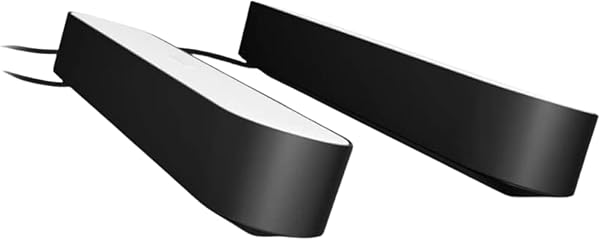
Available Models:
- Single Pack ASIN: B07FXRS4ZW - $80-90
- Double Pack ASIN: B07GXB3S7Z - $130-160
Strengths:
- Premium Build Quality: Aluminum construction with premium feel
- Exceptional Color Accuracy: Industry-leading color reproduction
- Mature Ecosystem: Works with extensive Hue product lineup
- Reliable Performance: Rock-solid wireless connectivity
- Professional Installation: Clean mounting options and cable management
Weaknesses:
- High Cost: Premium pricing puts it out of reach for many
- Requires Hub: Additional $50-80 investment for Hue Bridge
- Limited Screen Sync: Needs expensive Sync Box for real-time matching
- Fewer Built-in Effects: Relies more on ecosystem than standalone features
Govee Light Bar Options
Popular Gaming Models:
1. Govee Gaming Light for Monitor G1
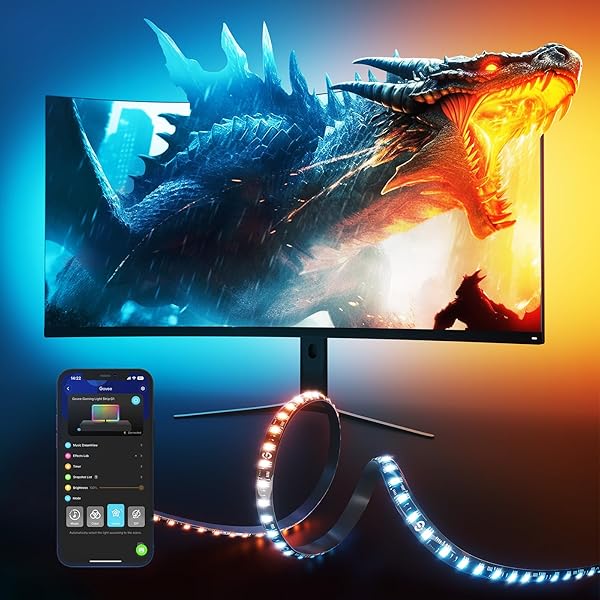
ASIN: B0C4NC62C6 - $40-60
Features:
- Built-in camera for screen color matching
- 27-34 inch monitor compatibility
- RGBIC technology with independent LED control
- 123 preset scene modes
- Works with curved monitors
- Double strip light beads for enhanced brightness
2. Govee Smart LED Light Bars
ASIN: B096WZXKZP - $30-45
Features:
- WiFi connectivity, no hub required
- RGBICWW (RGB + independent cool/warm white)
- Music sync capabilities
- Multiple mounting options
- Scene and music modes
- Voice assistant integration
3. Govee AI Gaming Sync Box Kit
ASIN: B0BTYFRYXR - $120-150
Features:
- HDMI 2.0 4K gaming passthrough
- Includes both light bars and monitor backlight
- Real-time screen color analysis
- 3 HDMI inputs, 1 output
- Works with gaming consoles and PCs
- CEC control support
Gaming Performance Comparison
Screen Color Synchronization
Philips Hue Play Bar:
- Requires separate Hue Play HDMI Sync Box ($230)
- Works with any HDMI source (consoles, PC, streaming devices)
- Extremely accurate color matching
- Smooth transitions with minimal lag
- Works with HDR content
- Total cost for sync setup: $400-450
Govee Light Bars:
- Built-in camera for color matching (most models)
- Works with any display content
- Good color accuracy, occasional drift in extreme lighting
- Fast response times
- Some models include HDMI sync box
- Total cost for sync setup: $40-150
Brightness and Color Quality
Philips Hue Play Bar:
- 530 lumens per bar (industry-leading)
- Exceptional color accuracy and saturation
- Smooth dimming curves
- Consistent performance over time
- Wide color gamut coverage
Govee Light Bars:
- 400-600 lumens depending on model
- Very good color accuracy for the price
- Occasional color drift over extended use
- Good dimming performance
- Solid color gamut, not quite Hue level
Smart Features and Control
Philips Hue Advantages:
- Mature, polished mobile app
- Advanced scheduling and automation
- Geofencing and presence detection
- Third-party app ecosystem
- HomeKit support with local control
- Professional lighting scenes
Govee Advantages:
- Direct WiFi connection (no hub required)
- Frequent app updates with new features
- Built-in music synchronization
- More gaming-specific presets
- DIY mode for custom effects
- Lower barrier to entry
Setup and Installation Comparison
Philips Hue Play Bar Setup
- Initial Investment: Hue Bridge required ($50-80)
- Network Setup: Bridge connects to router via ethernet
- Device Pairing: Simple button press pairing
- Mounting: Premium brackets and cable management
- Configuration: Extensive app-based customization
- Screen Sync: Additional Sync Box purchase required
Total Setup Time: 30-45 minutes for basic setup, additional time for sync features
Govee Light Bar Setup
- Network Connection: Direct WiFi pairing via app
- Device Discovery: Automatic device detection
- Mounting: Good quality brackets included
- Camera Calibration: Built-in camera requires position adjustment
- Configuration: Straightforward app-based setup
- Screen Sync: Works immediately after calibration
Total Setup Time: 15-30 minutes for complete setup including sync
Gaming Use Cases and Recommendations
Competitive Gaming
For serious competitive gaming where consistency and reliability matter most:
Recommendation: Philips Hue Play Bar
- Rock-solid performance under extended use
- No camera-based sync to potentially interfere
- Mature app with stable presets
- Can integrate with game-specific lighting mods
Casual/Streaming Gaming
For casual gamers who want impressive visual effects without breaking the bank:
Recommendation: Govee Gaming Light G1
- Built-in screen sync works great for streaming content
- Multiple effect modes for different game genres
- Great value for money
- Easy to expand with additional Govee products
Budget-Conscious Gamers
For gamers who want smart lighting on a tight budget:
Recommendation: Govee Smart LED Light Bars
- Entry-level pricing with smart features
- No additional hub costs
- Good enough performance for most scenarios
- Room to grow into the Govee ecosystem
Premium Gaming Setups
For enthusiasts building high-end gaming rooms:
Recommendation: Philips Hue Play Bar + Sync Box
- Best-in-class performance and reliability
- Seamless integration with other premium smart home devices
- Future-proof investment
- Professional appearance and build quality
Cost Analysis Over Time
Initial Investment
Philips Hue Complete Setup:
- 2x Play Light Bars: $130-160
- Hue Bridge: $50-80
- Sync Box (optional): $230
- Total: $410-470
Govee Complete Setup:
- Gaming Light G1: $40-60
- Or AI Gaming Sync Box Kit: $120-150
- Total: $40-150
Long-term Value
Philips Hue:
- Excellent resale value
- Long product lifecycles (5+ years typical)
- Extensive ecosystem for expansion
- Regular feature updates via bridge
- Premium build quality reduces replacement needs
Govee:
- Lower initial investment leaves budget for other upgrades
- Rapid product iteration (new models annually)
- Growing ecosystem at competitive prices
- Good warranty support
- May need replacement sooner than premium options
Integration with Gaming Setups
PC Gaming Integration
Both brands offer PC integration, but with different approaches:
Philips Hue:
- Official Hue Sync desktop app
- Works with popular games via third-party mods
- Razer Chroma integration
- Corsair iCUE compatibility
- More stable but fewer gaming-specific features
Govee:
- Govee Desktop app with gaming focus
- Built-in game detection modes
- Streamlabs integration for streaming
- More gaming-oriented features
- Some stability issues reported with intensive games
Console Gaming
For PlayStation/Xbox:
- Philips Hue: Requires HDMI Sync Box but works flawlessly
- Govee: Camera-based sync works well, some models include HDMI options
For Nintendo Switch:
- Philips Hue: Perfect for docked mode with sync box
- Govee: Good camera-based sync, portable light bars available
Related Smart Gaming Lighting
To complete your gaming lighting setup, consider these complementary articles:
- Best Smart Light Bars for Monitor Gaming
- Best LED Strip Lights for Gaming Setup
- Best Ambient Backlighting for Gaming Monitor
- Govee vs Philips Hue Gaming Lights
Product Purchase Links
Philips Hue Play Light Bars
Govee Gaming Light Bars
- Govee Gaming Light G1 on Amazon
- Govee Smart LED Light Bars on Amazon
- Govee AI Gaming Sync Box Kit on Amazon
- Govee Products on Newegg
Final Verdict
The choice between Philips Hue Play Bars and Govee Light Bars ultimately depends on your priorities, budget, and gaming setup goals.
Choose Philips Hue Play Bar if:
- You want the best possible color accuracy and brightness
- You're building a premium gaming setup
- You already have or plan to invest in the Hue ecosystem
- Reliability and long-term support are priorities
- Budget is less of a concern
Choose Govee Light Bars if:
- You want excellent value for money
- You prefer built-in screen sync without additional hardware
- You're starting your first smart lighting setup
- You want gaming-specific features and effects
- You prefer frequent product updates and new features
For most gamers, Govee Gaming Light G1 offers the best balance of features, performance, and value. The built-in camera sync works surprisingly well, and the price point makes it accessible for upgrading multiple rooms or setups.
However, if you're building a premium gaming room and want the absolute best performance, Philips Hue Play Bars with the Sync Box remain the gold standard, despite the higher cost.
Both brands offer excellent products that will enhance your gaming experience significantly. The "wrong" choice here would be not adding any ambient lighting to your setup at all!
This article contains affiliate links. We earn a small commission from qualifying purchases at no additional cost to you.